
When organizations move from legacy systems to modern platforms, the most critical hurdle is not the software itself but the data. Data migration challenges often determine whether an ERP or cloud adoption succeeds or stalls.
At Liberty Grove Software, we've seen firsthand how careful planning around mapping, cleansing, transformation, and reconciliation makes the difference between a smooth transition and a painful one.
Migrating data is rarely just a matter of "lift and shift."
Legacy systems carry decades of history, inconsistencies, and redundancies. Without a solid enterprise data migration strategy, companies risk bringing confusion forward into the new environment.
Done right, however, migration becomes more than a technical step; it's an opportunity to modernize, improve governance, and build trust in data-driven decision-making.
What Are the Key Considerations When Migrating Data from a Legacy System to the Cloud?
A common question clients ask me is: "What are the things that we should consider when migrating data from legacy systems?"
From our experience, three stand out:
| Scope of data | Decide what is essential to migrate and what can be archived. Not every historical transaction needs to live in the new system. |
| Compliance requirements | Retain the fields and records required for regulatory reporting or audit, even if they're no longer central to operations. |
| Future usability | Structure the data in a way that supports reporting, analytics, and business growth. |
An enterprise data migration strategy should strike a balance between short-term needs (going live quickly) and long-term value (ensuring the data supports decision-making for years to come).
Step One: Data Mapping – Setting the Blueprint
Data mapping is the foundation of every migration project. It's about aligning legacy fields with new structures. That's where data mapping best practices come in:
- Engage stakeholders: The business understands data meaning better than IT alone.
- Document thoroughly: Long projects need consistent reference points.
- Address custom fields: Legacy customizations may require creative solutions.
Many clients ask: "Which data mapping and transformation tools are best suited for complex enterprise migrations?"
The answer depends on the scale and complexity, but ETL (extract, transform, load) platforms, combined with ERP-native import frameworks, usually provide the best balance of power and flexibility.
Increasingly, data migration automation tools also integrate AI capabilities, making mapping faster and more accurate.
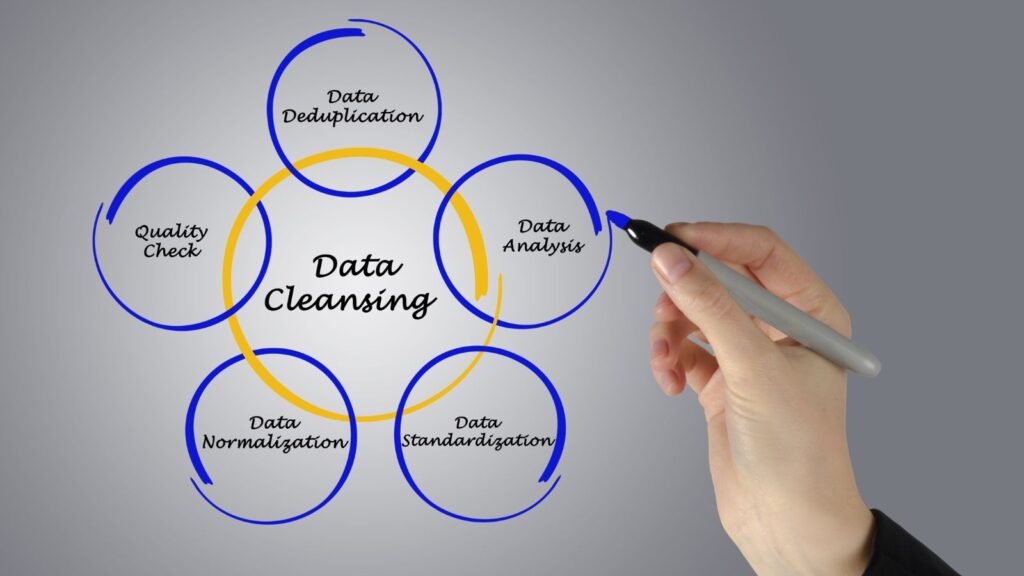
Step Two: Data Cleansing – Purging the Noise
Clean data leads to confident decision-making. Cleansing involves removing duplicates, correcting errors, and standardizing values to ensure accuracy. Examples include:
- Eliminating duplicate customer or vendor records with similar names
- Closing out inactive products
- Standardizing postal codes, tax IDs, and addresses
That's also where AI makes a difference. Traditional rules can only catch so much. With AI in data migration, fuzzy matching models and anomaly detection can identify errors humans often miss.
A frequent client concern is: "How can AI or ML techniques help in automating data cleansing, transformation, and reconciliation during migration?"
In practice, AI can:
- Detect duplicates with higher accuracy
- Predict missing values based on patterns
- Flag outliers that don't fit the expected rules
The result? Cleaner data with less manual labor.
Step Three: Data Transformation – Making It Fit
Even after mapping and cleansing, data must be reshaped to fit the new ERP or cloud environment. That's where data transformation strategies matter.
Typical transformations include:
- Format conversions: Adjusting date or currency formats
- Hierarchy restructuring: Aligning cost centers to new dimensional models
- Normalization: Standardizing units of measure, country codes, or naming conventions
- Enrichment: Adding attributes pulled from other systems
The right tools combine automation with flexibility. AI-driven platforms can propose transformation rules based on historical data, dramatically reducing manual effort. It's where how AI improves data migration becomes tangible: it doesn't just process faster; it learns patterns and adapts.

Step Four: Data Reconciliation – Building Trust
Reconciliation is the final step, and often the most underestimated. Teams ask: "How would you QA / validate data before and after a migration to ensure integrity?"
The answer lies in data reconciliation in migration:
- Compare record counts between systems
- Validate trial balances and subledgers
- Ensure open invoices and transactions align
- Run dual systems briefly to confirm outputs
Automated reconciliation tools can quickly catch discrepancies, but human validation remains essential. Ultimately, reconciliation builds trust. Without it, user adoption suffers because no one fully believes the numbers.
The Biggest Pitfalls in Migration Projects
In community discussions, a common thread emerges: "What are the biggest pitfalls or gotchas that make long-running migration projects drag on for years?"
From our perspective, the pitfalls usually include:
- Underestimating data volume: Trying to migrate everything instead of focusing on what matters
- Poor documentation: Losing track of mapping and rules mid-project
- Late stakeholder involvement: Business users brought in too late to validate assumptions
- Skipping reconciliation: Declaring success without validating accuracy
These are not just nuisances; they are the reasons projects fail. Addressing them upfront keeps migrations on schedule.

How AI Is Changing the Game
The rise of AI is reshaping what's possible in enterprise migrations. The improvement of data migration by AI is not a hypothetical concept; it's happening now.
AI assists by:
- Automating mapping: Reducing weeks of manual setup
- Accelerating cleansing: Using ML to detect duplicates and outliers
- Guiding transformation: Recommending standardization rules
- Streamlining reconciliation: Matching transactions intelligently
Combined with data migration automation tools, AI reduces risk, accelerates timelines, and frees teams to focus on oversight rather than grunt work.
However, there's a caveat: AI is powerful, but not infallible. Expert judgment and governance are non-negotiable. At Liberty Grove, we integrate AI tools into our migration projects while maintaining human oversight at the forefront of our approach. That balance yields the best results.
Turning Data Migration Challenges into Opportunities
Ultimately, overcoming data migration challenges is about more than moving records. It's about:
- Creating reliable, standardized data
- Strengthening governance
- Building confidence in business reporting
- Supporting future analytics and AI initiatives
Migration is not just a hurdle; it's a reset opportunity. Organizations that approach it strategically unlock a cleaner dataset and a stronger foundation for growth, instilling a sense of reassurance and confidence.
At Liberty Grove Software, we've helped clients across various industries transition confidently from legacy systems to modern ERP and cloud platforms. Whether through enterprise data migration strategy, proven data transformation strategies, or the adoption of AI in data migration, our focus remains the same: ensuring your data becomes an asset, not a liability.
Final Thoughts for Tackling Data Migration Challenges Successfully
Your new ERP or cloud system is only as good as the data it holds. By prioritizing mapping, cleansing, transformation, and reconciliation, and by leveraging AI where it adds the most value, you can overcome the toughest data migration challenges.
The path may be complex, but with the right tools, strategy, and oversight, your data migration can deliver not just a smooth transition but also a stronger future for your organization.
Let's talk. We’ll help you start your ERP Migration Journey.
About Andrew Good

Andrew Good, CEO, Liberty Grove Software
Andrew Good, CEO of Liberty Grove Software, a leader in digital transformation, directs the company with strategic insights that deliver impactful results. With over two decades of expertise in Microsoft technologies, Andrew has guided businesses through digital transformations across various industries, including manufacturing, finance, and healthcare.
Andrew's extensive knowledge comes from personal experiences with various companies. His hands-on operational knowledge stems from his experience in engineering and maintenance, as well as his operational roles at Unilever and Sony Music. Fourteen years of working with Microsoft Dynamics BC/NAV follows successful projects in ERP, Computerized Maintenance Management Systems (EAM), and quality systems.
His passion for technology is matched by his love for sailing, which inspires his leadership. Andrew parallels the precision required for navigating the seas with the challenges of steering a successful company. Under his leadership, Liberty Grove Software thrives, providing tailored solutions that empower clients and optimize operations with innovative, Microsoft-based systems.
Connect with Andrew on LinkedIn
Subscribe to Andrew’s Newsletter on LinkedIn

Digital transformation isn't just a buzzword; it's a lifeline for companies relying on aging ERP systems that no longer meet modern demands. It’s why we created this ERP Migration Roadmap to give companies the confidence to make the leap.
Whether you're running Microsoft Dynamics GP, NAV, or another legacy ERP platform, the shift to a cloud-based ERP like Microsoft Dynamics 365 Business Central (BC) is not only inevitable; it's an opportunity to reinvent how your business operates. With features such as seamless integration of business processes, advanced analytics for informed decision-making, and scalability to accommodate your business growth, BC offers a range of benefits that can significantly enhance your operations.
At Liberty Grove Software, we've guided countless organizations through this journey. One conversation stands out: I was sitting down with the CIO of a mid-sized manufacturing company last year.
He leaned back in his chair, arms crossed, and said, "Andrew, I know we have to do this, but the last thing I want is a drawn-out, disruptive project that paralyzes our business. How do we make this as smooth as possible?"
That's the question every executive asks, and it's precisely why having a clear, step-by-step ERP migration roadmap is essential.
Below, I'll share how we helped that CIO navigate his concerns and outline the proven path we use to take companies from discovery to go-live with confidence.
We also understand that ERP migration can be a complex process, with challenges such as data migration issues and user resistance.
With our expertise and proven methodology, Liberty Grove ensures your move to Business Central is seamless and sustainable.

1. Discovery: Building the Foundation for ERP Migration Success
Every successful ERP migration begins with discovery. That's where we assess your current ERP environment, business processes, and strategic goals. The objective isn't just to replicate what you have today in the cloud; it's to identify opportunities for improvement and innovation.
In this stage, we:
- Conduct stakeholder interviews to uncover pain points and priorities.
- Analyze your existing data, customizations, and integrations.
- Define your vision: What does success look like one year after migration?
When I met with that manufacturing CIO, he initially wanted to "move everything as-is." But through discovery, we uncovered redundant processes and outdated reports that were slowing down his team.
By challenging the status quo, we designed an ERP migration roadmap that modernized their ERP while simplifying operations.
2. Planning: Creating a Realistic ERP Migration Roadmap
Once discovery is complete, the next step is to turn insights into a clear migration plan. Planning is where we outline:
- Scope: Which modules, customizations, and third-party add-ons will be included?
- Timeline: A realistic project schedule that minimizes downtime and aligns with business cycles.
- Resources: Key internal champions and external partners who will drive the project.
- Budget: Including migration costs, licensing, and potential change management initiatives.
For our manufacturing client, timing was critical. Their busy season ran from September through November, so go-live had to fall outside that window. We structured their migration to Business Central in quieter months, reducing disruption while keeping leadership aligned with the broader digital transformation strategy.

3. Preparation: Cleaning and Aligning ERP Data
Data is the lifeblood of your ERP system, but legacy ERP systems often carry decades of outdated or duplicate data. Migrating "as-is" can create inefficiencies in your new cloud environment.
During preparation, we:
- Audit your existing data for accuracy and relevance.
- Determine which data should be archived versus migrated.
- Standardize formats and eliminate redundancies.
The CIO's finance team initially felt overwhelmed at the thought of cleaning their general ledger history. By breaking the work into phases and leveraging automation tools, we streamlined the process.
The result? A cleaner, more reliable Business Central migration with fewer headaches down the road.
4. Design and Configuration: Tailoring Microsoft Dynamics 365 Business Central
One of the most significant benefits of Microsoft Dynamics 365 Business Central is its flexibility. At this stage, we configure the system to align with your needs while embracing best practices.
Activities include:
- Mapping existing processes to Business Central's modern workflows.
- Incorporating necessary extensions or add-ons.
- Setting up user roles, security, and approvals.
At Liberty Grove, our mantra is 'configure first, customize second'. That means we prioritize setting up the system to align with your business needs using the standard features of Microsoft Dynamics 365 Business Central. Companies often carry over outdated customizations from legacy ERP systems, adding complexity without value. Instead, we help you focus on what drives growth today, not what made sense 15 years ago.

5. Testing: Validating Your ERP Migration Roadmap
Testing is where your ERP migration becomes tangible. It's the chance to validate processes, train users, and refine the system before going live.
Key testing phases include:
- Unit testing: Confirming core functionality.
- Integration testing: Ensuring third-party apps and data flows run smoothly.
- User acceptance testing (UAT): Allowing employees to confirm usability and accuracy.
Our client's CIO initially feared testing would slow the project down. Instead, by introducing iterative cycles, testing built confidence, helping end users feel ready for the switch to Microsoft Dynamics 365 Business Central.
6. Training: Driving ERP User Adoption
Technology is only half the battle; people are the other half. Training ensures user adoption and long-term ROI for your ERP migration project.
We design training programs that:
- Are role-based and tailored to daily tasks.
- Blend formal instruction with hands-on practice.
- Include ongoing support beyond go-live.
For our manufacturing client, combining in-person workshops with digital modules created a culture of confidence. Their CFO later told me, "This was the first rollout where my team didn't feel left behind."
7. Go-Live: Transitioning to Business Central with Confidence
Go-live is the moment everyone anticipates, but it's not the finish line. It's the start of your journey in Microsoft Dynamics 365 Business Central.
A successful go-live includes:
- Final data migration and cutover.
- On-site and remote support for transition.
- Quick resolution of post-launch issues.
That once-nervous CIO? After go-live, he sent me a note: "Andrew, this was the smoothest major system change in my career. Thank you." His confidence underscored the power of a well-executed ERP migration roadmap.

8. Post-Go-Live Optimization: Unlocking the Full Potential of ERP
The real value of Business Central emerges after launch, when companies move from stabilization to optimization.
Post-go-live steps include:
- Refining workflows based on real-world input.
- Expanding functionality with new extensions.
- Leveraging analytics and AI for more intelligent decisions.
The companies that thrive are those that treat their ERP migration not as a one-time project, but as an ongoing journey toward efficiency and innovation.
The Liberty Grove Advantage
Migrating to Microsoft Dynamics 365 Business Central isn't just a technology upgrade; it's a strategic transformation. At Liberty Grove Software, we bring:
- Deep expertise: Decades of experience with Dynamics GP, NAV, and BC migrations.
- Proven methodology: A step-by-step ERP migration roadmap that minimizes risk.
- A partner mindset: We don't just implement software; we empower your team to succeed long-term.
The manufacturing CIO I mentioned earlier? Today, his company closes its books three days faster, generates reports in minutes instead of hours, and operates with agility unthinkable under their old legacy ERP system.
Ready to Begin Your ERP Migration Journey?
If you're ready to explore moving from your legacy ERP system to Microsoft Dynamics 365 Business Central, the first step is a conversation. Let's build your personalized ERP migration roadmap together so that you can move forward with clarity, confidence, and measurable results.
Let's talk. We’ll help you start your ERP Migration Journey.
About Andrew Good
Andrew Good, CEO, Liberty Grove Software
Andrew Good, CEO of Liberty Grove Software, a leader in digital transformation, directs the company with strategic insights that deliver impactful results. With over two decades of expertise in Microsoft technologies, Andrew has guided businesses through digital transformations across various industries, including manufacturing, finance, and healthcare.
Andrew's extensive knowledge comes from personal experiences with various companies. His hands-on operational knowledge stems from his experience in engineering and maintenance, as well as his operational roles at Unilever and Sony Music. Fourteen years of working with Microsoft Dynamics BC/NAV follows successful projects in ERP, Computerized Maintenance Management Systems (EAM), and quality systems.
His passion for technology is matched by his love for sailing, which inspires his leadership. Andrew parallels the precision required for navigating the seas with the challenges of steering a successful company. Under his leadership, Liberty Grove Software thrives, providing tailored solutions that empower clients and optimize operations with innovative, Microsoft-based systems.
Connect with Andrew on LinkedIn
Subscribe to Andrew’s Newsletter on LinkedIn

If you're a manufacturing executive, you've likely heard the acronyms MTS, MTO, ETO, and Process. But what do they really mean for your operations – and, more importantly, for your manufacturing ERP strategy success?
At Liberty Grove Software, we've worked with manufacturers across North America and beyond – from small to medium-sized, privately held companies to global enterprises driving digital innovation.
Regardless of your size or sector, the first step in any successful ERP journey is understanding the type of manufacturer you are.
This understanding empowers you to make informed decisions and take control of your ERP strategy.
MTS, MTO, ETO, or Process: What's Your Model?
Let's break it down:
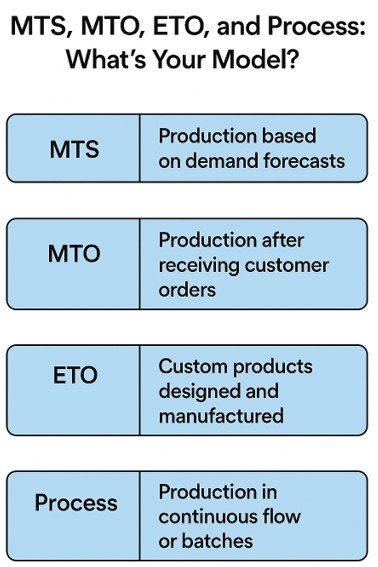
- Make-to-Stock (MTS): You produce based on forecasted demand. Think consumer goods or high-volume parts. Speed and inventory control are key.
- Make-to-Order (MTO): You build only after receiving a customer order. This approach reduces inventory risk but requires tight scheduling.
- Engineer-to-Order (ETO): You design and build unique products according to customer specifications. It's complex but highly customizable.
- Process Manufacturing: You produce in batches or continuous flows, common in food, chemicals, or pharmaceuticals. Traceability and compliance are critical.
Each model has unique implications for your Microsoft Dynamics 365 ERP system –from how you structure your Bill of Materials to how you plan production and track costs.
Where to Start: ERP for Manufacturing Success Begins with Clarity
Before diving into configuration or customization, ask yourself:
- What's our dominant manufacturing model?
- Do we need to support multiple models (e.g., MTO + MTS)?
- What are our most significant pain points – inventory, lead times, costing, reporting?
This clarity is not just a starting point, but a reassurance that you are on the right track. It helps you align your ERP implementation with real-world operations, ensuring that your team, from finance to production, speaks the same language and is confident in the ERP strategy.

Key Elements of a Strong Manufacturing ERP Foundation
1. Bill of Materials (BOM)
Your BOM is the DNA of your product. Whether it's single-level or multi-level, it defines what goes into your finished goods. In Dynamics 365, BOMs can be linked to routings, cost centers, and even version-controlled for ETO environments.
2. Work Centers, Machine Centers & Routings
These define how and where work gets done. Work Centers represent labor or machine groups, while Routings define the sequence of operations. Accurate setup here drives everything from scheduling to costing.
3. Flow of Production Orders
Understanding the lifecycle of a production order – Created → Released → Started → Finished → Reported as Finished → Costed – is essential. Each status triggers different actions in the system and impacts inventory, labor, and financials.
4. Planning and Sequencing
That's where the rubber meets the road. Dynamics 365 offers robust tools for Master Planning, Demand Forecasting, and Finite Scheduling. For MTO and ETO, sequencing ensures high-priority jobs don't get stuck behind low-value work.
5. Costing
Whether you use Standard, Actual, or Hybrid Costing, your ERP must reflect true production economics. Dynamics 365 supports layered costing models, including activity-based costing, which is ideal for complex operations.
6. Reporting Options
Executives need visibility. Dynamics 365 integrates with Power BI, enabling real-time dashboards for KPIs like OEE, throughput, and cost variances. You can also drill into production variances, scrap rates, and capacity utilization.
7. Integration Options
Modern manufacturers don't operate in silos. Dynamics 365 integrates with:
- MES systems for shop floor control
- PLM tools for engineering collaboration
- EDI platforms for supplier and customer communication
- Finance and HR systems for unified operations
Final Thoughts: ERP That Fits Your Manufacturing DNA
At Liberty Grove Software, we understand that every business is unique; your ERP should adapt to your business, not the other way around.
Whether you're an SMB or a global manufacturer scaling operations, your ERP should reflect your unique production model, cost structure, and reporting needs. We are here to cater to your unique needs and help you achieve ERP success.
We believe your system should reflect how you operate, from BOMs to batch flows.
Ready to transform your ERP strategy Success from generic to genius? Let's talk.
Contact Liberty Grove for a complimentary consultation on how its team of experts can help optimize your manufacturing operation with Microsoft Dynamics 365. Let our experts help configure Microsoft Dynamics 365 to match your manufacturing DNA.
About Andrew Good
Andrew Good, CEO, Liberty Grove Software
Andrew Good, CEO of Liberty Grove Software, a leader in digital transformation, directs the company with strategic insights that deliver impactful results. With over two decades of expertise in Microsoft technologies, Andrew has guided businesses through digital transformations across various industries, including manufacturing, finance, and healthcare.
Andrew's extensive knowledge comes from personal experiences with various companies. His hands-on operational knowledge stems from his experience in engineering and maintenance, as well as his operational roles at Unilever and Sony Music. Fourteen years of working with Microsoft Dynamics BC/NAV follows successful projects in ERP, Computerized Maintenance Management Systems (EAM), and quality systems.
His passion for technology is matched by his love for sailing, which inspires his leadership. Andrew parallels the precision required for navigating the seas with the challenges of steering a successful company. Under his leadership, Liberty Grove Software thrives, providing tailored solutions that empower clients and optimize operations with innovative, Microsoft-based systems.
Connect with Andrew on LinkedIn
Subscribe to Andrew’s Newsletter on LinkedIn

When manufacturing executives consider implementing a modern ERP system, understanding the Microsoft Dynamics 365 Business Central basics is often not the first thing that comes to mind.
Conversations typically focus on high-level outcomes, such as streamlined operations, real-time reporting, improved supply chain visibility, and stronger customer engagement. These strategic goals are essential and often drive the investment in new technology.
However, overlooking how BC works on a day-to-day level can make or break the success of your ERP journey. The fundamentals – search, personalization, and shortcuts – are what enable those big-picture results to take shape across the organization.
It may seem counterintuitive.
Why should a CEO, CFO, or COO worry about search functions, shortcut keys, or personalization features? Isn't that the domain of end users or IT staff?
Understanding the basics of BC empowers leadership, directly impacting adoption, efficiency, and long-term ROI.
When executives grasp the fundamentals of BC, they set the tone for how the system is embraced across the organization, instilling a sense of control and confidence in their decision-making.

Why Executives Need to Understand the Basics
1. Leading by Example
Culture flows from the top. When senior leaders show they understand the ERP environment, even at a practical level, it demonstrates commitment and credibility. Employees notice when a CEO can navigate BC without fumbling for help.
They also notice when leadership relies on others for the smallest actions. That difference can set the tone for whether your teams see BC as empowering or burdensome.
2. Driving Adoption and ROI
ERP systems are a significant investment for manufacturing companies, but their full value is often not realized due to adoption issues.
When executives understand and emphasize the small efficiencies that make BC user-friendly, they drive adoption from the ground up, playing a crucial role in maximizing ROI.
3. Seeing the System as a Strategic Tool
The basics of BC are not just IT details. They are enablers of strategic visibility. For instance, knowing how to personalize dashboards in BC allows leaders to focus on KPIs that matter most, enabling faster, more informed decision-making at the top.

The Basics Every Manufacturing Executive Should Know
Let's look at some of the essentials in Business Central that every leader should understand.
1. The Power of Search
Business Central's search feature, often referred to as "Tell Me", is one of its most underrated tools. Instead of navigating menus, users can type what they need.
Whether it's a customer record, a financial report, or a production order, the system brings it up instantly.
For manufacturing leaders, this means you don't need to memorize where everything lives in the ERP. If you want to see yesterday's production variances or review overdue payables, just search.
It's the quickest path to insight, and it encourages leaders to interact with BC directly rather than waiting for reports.
2. Shortcut Keys Save Time
Keyboard shortcuts may seem trivial, but they add up. BC includes dozens of shortcuts designed to accelerate navigation and data entry. For example:
- Alt+Q opens the "Tell Me" search bar.
- Alt+Shift+F12 expands or collapses the navigation bar.
- Ctrl+F3 opens filtering options.
Executives might not need every shortcut, but knowing a few can reduce friction when reviewing data. More importantly, it signals to staff that leadership values efficiency, which encourages adoption of best practices across the organization.
3. Personalization for Role-Relevant Views
One of BC's greatest strengths is its ability to personalize dashboards and role centers. Manufacturing leaders can tailor their home screens to surface the KPIs that matter most.
For example:
- A COO might want production order status, machine utilization rates, and throughput metrics front and center.
- A CFO may prioritize cash flow forecasts, cost variances, and accounts receivable aging.
- A CEO might prefer a broader view: revenue trends, on-time delivery rates, and profitability by product line.
By understanding personalization, executives can design dashboards that align with strategic priorities, providing them with real-time leadership visibility and a deeper understanding of their business.
4. Filters and Views for Deeper Insights
Filters in BC allow users to zero in on the data that matters most. For instance, a leader might filter open sales orders by region to understand demand patterns or review overdue production orders by line.
Saving these filters as "views" provides instant access next time.
Leaders who understand filtering don't just wait for static reports; they actively interrogate the system to make better decisions.
That's especially valuable in manufacturing, where agility is often the difference between meeting customer demand and missing opportunities.
5. Excel Integration
Business Central integrates seamlessly with Excel. With a click, you can export data to Excel for deeper analysis or even push updates back into BC. For executives, this means there's no need to choose between "ERP" and "spreadsheet."
You can leverage both together, bridging the gap between operational data and strategic analysis.
6. Notifications and Alerts
You can configure BC to alert you when key thresholds are met or missed. For example, a CFO might receive a notification when cash falls below a certain level, while a COO could be alerted about delayed production orders.
Understanding how alerts work ensures leaders are proactively informed, rather than reactively surprised, giving them a sense of control and preparedness for potential issues.

The Strategic Payoff of Mastering the Basics
At first glance, basics like search, shortcuts, and personalization may feel tactical. But when executives understand and leverage them, the strategic payoff is significant.
- Faster Decisions – Leaders don't wait for IT or reports; they find answers themselves.
- Increased Adoption – Employees follow leadership's example, using BC more fully and consistently.
- Higher ROI – The organization realizes more value from its ERP investment by fully exploiting built-in features.
- Operational Agility – Leaders can pivot faster because they know how to surface the correct data at the right time.
In manufacturing, where margins are tight and competition is global, these advantages are not "nice-to-have." They are the difference between staying ahead and falling behind.
Common Pitfalls When Leaders Ignore the Basics
I've seen many manufacturing companies implement BC with high hopes, only to stumble in execution. In almost every case, leadership's lack of familiarity with the basics plays a role. Some common pitfalls include:
- Overreliance on Reports – Waiting for others to prepare reports instead of exploring BC directly.
- Bottlenecks in IT – Every small question is routed through IT because leaders aren't comfortable navigating the system.
- Low User Adoption – Employees see leaders struggling or disengaged, and adoption suffers.
- Missed Opportunities – Leaders fail to see data patterns in real time because they don't know how to filter, personalize, or search effectively.
Avoiding these pitfalls doesn't require technical expertise; it requires executive curiosity and a willingness to engage with the basics.
Building a Culture of ERP Excellence
At Liberty Grove Software, we've spent decades helping manufacturing companies implement and optimize ERP systems.
One of our consistent observations is that successful implementations are not just about technology. They're about culture.
When leadership understands the basics of Business Central, they:
- Model curiosity and engagement with the system.
- Empower teams to use BC fully, not just at a surface level.
- Create alignment between strategic goals and day-to-day usage.
It's how ERP becomes more than just software; it becomes a strategic enabler of growth, agility, and profitability.
Personalization in Action
Each executive role addresses a different aspect of the business, and that means each person needs different information. By personalizing dashboards this way, executives move from reactive firefighting to proactive management – using Business Central as a real-time command center.
| Role | Key Dashboard Elements | Why It Matters |
| COO | Production Orders Machine Utilization Inventory Levels Throughput Metrics On-Time Delivery Rate | Ensures operations run smoothly, resources are optimized, and customer demand is met without delays. |
| CFO | Cash Flow Forecast Accounts Receivable Aging Cost Variances Profitability by Product Line Vendor Payables | Provides visibility into financial health, controls costs, and supports better forecasting. |
| CEO | Revenue Trends Gross Margin On-Time Delivery Rate Top Customers Strategic KPIs | Keeps leadership focused on growth, profitability, customer satisfaction, and long-term strategy. |
Final Thoughts on Microsoft Dynamics 365 Business Central Basics
As a CEO who has worked with manufacturing companies across North America, I can confidently say that understanding the basics of Microsoft Dynamics 365 Business Central is within your reach.
It's one of the most innovative leadership moves you can make.
By mastering search, shortcut keys, personalization, filters, and other simple tools, you not only make your job easier; you set the tone for your entire organization. You demonstrate that BC isn't just "IT's system." It's your system. It's the backbone of your company's growth and competitiveness.
Understanding Microsoft Dynamics 365 Business Central basics isn’t just for end users; it’s a leadership skill that drives adoption, efficiency, and ROI across the entire organization. When executives embrace the fundamentals—such as search, personalization, shortcuts, and filtering—they demonstrate confidence, empower their teams, and unlock the full value of their ERP investment. By mastering the basics, leaders turn Business Central into more than just a system—it becomes a true enabler of agility, insight, and long-term growth.
At Liberty Grove Software, we help manufacturing leaders and their teams not just implement BC but thrive with it. That begins with the basics and builds toward long-term strategic success.
If you're ready to explore how mastering the essentials of Business Central can unlock more value for your company, let's talk.
3 Shortcuts Every CEO Should Know in Business Central
Even if you only remember a few, these shortcut keys can save time and show your team that you're comfortable in the system:
- Alt + Q: Opens the "Tell Me" search bar.
- Find anything in the system without clicking through menus.
- Ctrl + Alt + F1: Opens Page Inspection.
- Quickly see details behind the numbers on your screen; excellent for drilling into manufacturing data or financials.
- Ctrl + F3: Opens the filter pane.
- Instantly narrow results, whether you're reviewing sales orders, vendor invoices, or production variances.
You don't need to memorize dozens of shortcuts. Just a handful can dramatically improve your comfort level in Business Central.
Ready to Master the Business Central Basics for Smarter Manufacturing?
At Liberty Grove Software, we know that success with Microsoft Dynamics 365 Business Central starts with the essentials. When leaders understand search, shortcuts, personalization, and other basics, they don't just use an ERP system; they drive adoption, efficiency, and real ROI across the organization.
Let us help you transform Business Central into a powerful tool that empowers your entire leadership team, streamlines operations, and strengthens decision-making.
Let's talk. We'll show you how mastering the basics in Business Central can unlock faster insights, boost performance, and prepare your manufacturing business for the future.
About Andrew Good
Andrew Good, CEO, Liberty Grove Software
Andrew Good, CEO of Liberty Grove Software, a leader in digital transformation, directs the company with strategic insights that deliver impactful results. With over two decades of expertise in Microsoft technologies, Andrew has guided businesses through digital transformations across various industries, including manufacturing, finance, and healthcare.
Andrew's extensive knowledge comes from personal experiences with various companies. His hands-on operational knowledge stems from his experience in engineering and maintenance, as well as his operational roles at Unilever and Sony Music. Fourteen years of working with Microsoft Dynamics BC/NAV follows successful projects in ERP, Computerized Maintenance Management Systems (EAM), and quality systems.
His passion for technology is matched by his love for sailing, which inspires his leadership. Andrew parallels the precision required for navigating the seas with the challenges of steering a successful company. Under his leadership, Liberty Grove Software thrives, providing tailored solutions that empower clients and optimize operations with innovative, Microsoft-based systems.
Connect with Andrew on LinkedIn
Subscribe to Andrew’s Newsletter on LinkedIn

In today’s hyper-competitive manufacturing sector, leaders are under pressure to deliver more: more precision, more speed, more customer value – without adding operational complexity. For many organizations, the missing link is a truly connected ERP-CRM integration in manufacturing strategy.
ERP systems like Microsoft Dynamics 365 Business Central (BC) manage core operations: production planning, inventory control, procurement, and financials.
CRM platforms, on the other hand, manage the customer-facing side: sales pipelines, marketing campaigns, service management, and account histories.
When these systems work in silos, decision-makers lack the whole picture. Sales may overpromise on delivery dates because they can’t see production capacity.
Operations may struggle to prioritize orders without understanding customer urgency or strategic value. Finance may waste hours reconciling mismatched data from separate systems.
ERP-CRM integration closes that gap, creating a 360° operational and customer view, and for manufacturers, that’s a competitive advantage you can’t afford to overlook.

The Disconnect: How Siloed ERP and CRM Systems Limit Growth
Even the most sophisticated standalone ERP and CRM systems have limitations when they aren’t integrated:
1. Data Silos Create Inefficiency
Without integration, sales, operations, and finance each work from their own “version of the truth.” That means more manual data entry, more errors, and slower decision-making.
2. Forecasting Falls Short
Demand forecasts lack accuracy when sales projections aren’t tied directly to ERP production planning and inventory data. That leads to either missed opportunities or costly overproduction.
3. Delayed Order Fulfillment
Customer commitments may be made without visibility into real-time stock levels or supplier lead times, creating fulfillment delays and strained relationships.
4. Missed Upsell and Service Opportunities
Without a unified customer history, account managers may miss opportunities for repeat orders, cross-sells, or proactive service outreach.
For manufacturing executives, these gaps translate into lost revenue, higher costs, and reduced customer loyalty.
How Microsoft Dynamics 365 Business Central Unites ERP and CRM Data
Microsoft Dynamics 365 Business Central offers native and extended integrations with the Microsoft Dynamics 365 Customer Engagement (CE) suite, or other leading CRM platforms, ensuring every team works from the same real-time data set.
Key benefits for manufacturers:
| Single Source of Truth | From the initial sales inquiry to final delivery, every interaction is captured in one shared system. |
| Quote-to-Cash Visibility | Sales teams can see current inventory and production capacity before promising delivery dates. Operations can prioritize high-value or urgent orders based on CRM data. |
| Automated Data Flows | Customer details, order history, and production status update automatically across ERP and CRM, reducing manual entry and errors. |
| Integrated Reporting | Combine operational KPIs with customer satisfaction metrics in Power BI for a complete performance picture. |
With Business Central, ERP-CRM integration isn’t an afterthought; it’s an enabler of faster, more accurate, and more customer-focused decision-making.
Real-World Gains from ERP-CRM Integration in Manufacturing
Here’s how integration delivers tangible results:
Case Study: Precision Component Manufacturer
Challenge: The company’s sales team was closing deals without visibility into production schedules, causing delays and customer dissatisfaction.
Solution: Liberty Grove integrated Dynamics 365 BC with Dynamics 365 Sales, enabling sales reps to check production capacity in real time before finalizing orders.
Outcome: On-time delivery rates improved by 22%, and customer satisfaction scores rose by 18% within six months.
Case Study: Industrial Equipment Supplier
Challenge: After-sales service scheduling was reactive and inefficient.
Solution: Integration allowed service teams to see equipment usage data from ERP alongside service history in CRM.
Outcome: Proactive maintenance visits reduced emergency breakdown calls by 30%, improving both efficiency and customer trust.
The Liberty Grove Approach: From Assessment to Seamless Integration
Implementing ERP-CRM integration requires more than just connecting two systems. It’s about aligning processes, teams, and data flows to deliver measurable value.
Our 5-step integration methodology:
1. Strategic Assessment
- Map your sales, service, and operations workflows.
- Identify data gaps that limit performance.
- Align integration goals with business outcomes.
2. System Design
- Define how ERP and CRM data will flow.
- Configure role-based dashboards to keep the correct data in front of the right people.
3. Implementation
- Deploy integration tools and connectors (native or third-party).
- Migrate and clean data for accuracy and usability.
4. User Enablement
- Train teams to use integrated workflows in real-world scenarios.
- Provide documentation and quick-reference guides.
5. Optimization & Support
- Monitor adoption rates and data quality.
- Refine dashboards, reports, and automation as your needs evolve.
Scaling for the Future: Building a Connected Manufacturing Ecosystem
ERP-CRM integration is just the first step toward a fully connected manufacturing enterprise. Once data flows seamlessly between systems, you can layer on advanced capabilities such as:
- AI-Driven Demand Forecasting – Predict demand with greater accuracy by combining sales trends with production and supply chain data.
- IoT Integration – Feed real-time machine and production line data into both ERP and CRM for predictive maintenance and service automation.
- Customer Self-Service Portals – Give customers access to order status, shipment tracking, and service scheduling directly from your integrated system.
- Global Multi-Entity Coordination – Manage sales and production across regions with unified reporting and compliance oversight.

ERP and CRM: More than Just Software; A Strategic Advantage
When implemented strategically, ERP-CRM integration in manufacturing delivers more than operational efficiency; it drives top-line growth and strengthens customer loyalty.
For C-suite executives, the value lies in:
- Faster time-to-market for new products
- Improved cash flow through more accurate invoicing and payment cycles
- Reduced churn from better service and relationship management
- Greater agility in responding to market or customer shifts
Don’t let disconnected systems hold back your growth.
Talk to Liberty Grove about how ERP-CRM integration with Microsoft Dynamics 365 Business Central can streamline your sales and operations today.
Preparing Your Organization for AI, IoT, and Predictive Analytics
The future of manufacturing is data-driven, and integration is the foundation. By uniting ERP and CRM, you prepare your organization for emerging technologies that rely on shared, accurate data.
With Liberty Grove as your partner, you’ll be ready to:
- Adopt predictive analytics to optimize production and sales cycles
- Deploy IoT-enabled service models for proactive maintenance
- Use AI to recommend cross-sell and upsell opportunities to your sales team
Conclusion
ERP-CRM integration in manufacturing is no longer optional; it’s essential for staying competitive. By combining Microsoft Dynamics 365 Business Central with a robust CRM platform, you can break down silos, improve decision-making, and create a customer experience that drives loyalty and revenue.
Ready to Unite your ERP and CRM for Smarter Manufacturing?
Let Liberty Grove Software help you unite your ERP and CRM, align operations, boost customer satisfaction, and prepare for the future.
Let’s connect and show you how ERP-CRM integration can help you boost delivery speed, increase revenue, and delight customers – without adding complexity.
About Andrew Good
Andrew Good, CEO, Liberty Grove Software
Andrew Good, CEO of Liberty Grove Software, a leader in digital transformation, directs the company with strategic insights that deliver impactful results. With over two decades of expertise in Microsoft technologies, Andrew has guided businesses through digital transformations across various industries, including manufacturing, finance, and healthcare.
Andrew's extensive knowledge comes from personal experiences with various companies. His hands-on operational knowledge stems from his experience in engineering and maintenance, as well as his operational roles at Unilever and Sony Music. Fourteen years of working with Microsoft Dynamics BC/NAV follows successful projects in ERP, Computerized Maintenance Management Systems (EAM), and quality systems.
His passion for technology is matched by his love for sailing, which inspires his leadership. Andrew parallels the precision required for navigating the seas with the challenges of steering a successful company. Under his leadership, Liberty Grove Software thrives, providing tailored solutions that empower clients and optimize operations with innovative, Microsoft-based systems.
Connect with Andrew on LinkedIn
Subscribe to Andrew’s Newsletter on LinkedIn

In manufacturing, timing is everything. Whether you're tracking raw materials, managing production schedules, or meeting delivery commitments, the margin for error is slim. But there's one element that even the best ERP system can't automate: human knowledge. And that puts your organization at risk when ERP knowledge transfer in manufacturing is compromised.
As someone who has spent decades helping manufacturers implement and optimize Microsoft Dynamics 365 Business Central (BC), I've seen firsthand what happens when a key person leaves, and their knowledge leaves with them.
Sometimes it's a senior production planner who built the original BOM logic, or a finance lead who knew how to close the month in Dynamics 365 "their way." Sometimes it's the person who knows which reports leadership relies on, and how to run them.
The result? Disruptions, inefficiencies, and sometimes costly mistakes.
So, how do we protect and transfer that knowledge – especially when new hires join or seasoned team members move on?
At Liberty Grove Software, with our extensive experience in helping manufacturers turn knowledge into process, we are well-equipped to protect your business from the risks of transition.
Let's discuss what this means for your organization.
The Manufacturing Knowledge Gap Is Real – and Growing
Manufacturing companies today face a perfect storm:
- Retirements from long-tenured employees
- High turnover in key operational roles
- A competitive hiring landscape for skilled ERP users
- Increasing complexity in ERP systems and integrations
What's at stake isn't just process fluency: it's institutional memory. When someone who has been "keeping the ERP running" leaves, new users often encounter cryptic documentation, outdated Excel sheets, or simply no direction at all.
Microsoft Dynamics 365 BC is a powerful system. But it only works well if the people using it know what to do, when to do it, and why it matters.

The Hidden Cost of Poor Knowledge Transfer
Let me give you a real-world example.
Allow me to illustrate the consequences of poor knowledge transfer with a real-world example from one of our clients, a precision parts manufacturer.
Their long-time operations manager, who had been with them for 22 years, retired. He was the one who had built many of the custom reports in their Dynamics 365 BC system and managed production planning.
Unfortunately, nothing was fully documented. When he left, his replacement spent the first three months dealing with the aftermath instead of managing the floor.
Liberty Grove was approached to reverse engineer processes, rebuild reports, and document everything in a usable format. But more importantly, we helped turn that undocumented tribal knowledge into repeatable, scalable procedures so the next transition wouldn't be so painful.
That not only saved them from potential costly mistakes but also from the additional cost of the replacement's time spent on firefighting.
That's the real cost of poor knowledge transfer:
- Disruption in production workflows
- Inaccurate data in ERP reports and KPIs
- Inefficiencies in training new hires
- Loss of trust in the ERP system itself

Why Dynamics 365 BC Needs Human Context
Dynamics 365 BC is flexible by design. It supports various manufacturing models – MTS, MTO, ETO, and Process – as well as numerous ways to structure data, workflows, costing, and planning.
However, that flexibility can backfire when a company relies on how one person set it up, rather than embedding that logic into the system or shared documentation.
Some common knowledge transfer traps we see:
- Custom fields that no one remembers who added them, or why
- Excel exports used to "fix" reports instead of solving issues in BC
- Workflow rules based on old processes or people who are no longer around
- Untrained new hires clicking through screens without understanding the impact
That's where Liberty Grove comes in. We help organizations surface, capture, and transfer that knowledge – not just for continuity, but to drive better long-term performance.
How Liberty Grove Helps Manufacturers Secure Their Know-How
At Liberty Grove, our goal isn't just to configure a system; it's to empower your people to use it effectively. Here's how we support knowledge transfer at every step:
1. Knowledge Mapping
We start by identifying where the team's critical knowledge lives:
- Who knows how production orders are sequenced?
- Who understands costing methodology in the ERP?
- Who runs key month-end reports?
Once we identify the gaps, we can create a plan to capture and document that knowledge before it's lost.
2. Process Documentation in Plain English
We create step-by-step documentation that explains:
- What to do
- Why it matters
- What to watch out for
- We often embed screenshots from Dynamics 365 BC, include user role context, and document exceptions and workarounds that are business-critical.
3. ERP Training for New Hires
We offer training sessions tailored to various roles, including production planners, buyers, controllers, sales administrators, and other key personnel. That helps new hires get up to speed more quickly and ensures consistency, even when onboarding is happening rapidly.
4. Building Resilience Into the System
Where possible, we replace tribal knowledge with system rules:
- Automate approvals, alerts, or calculations using Power Automate
- Configure role centers in BC for personalized dashboards
- Use templates and standard routings to minimize manual setup
5. Ongoing Advisory Support
Sometimes the knowledge transfer isn't just about handing over a playbook; it's about helping new leaders make confident decisions. We offer ongoing advisory services to provide that safety net as teams evolve and grow.
Creating a Culture of ERP Literacy
C-suite leaders in manufacturing often ask me, "How do we future-proof this system?"
My answer: Invest in your people.
An ERP is only as strong as the team using it. If only one person understands your costing structure, BOM logic, or how to interpret capacity planning reports, that's not a strategy; it's a risk.
Encourage documentation. Build in process reviews. Assign system stewards. Create a culture where Dynamics 365 BC isn't a black box, but a transparent tool used by everyone, from production to finance.
And most importantly, work with partners who care as much about the people as they do about the system.

Final Thoughts: It's Not Just About Turnover – It's About Continuity
Whether you're onboarding a new hire or bracing for the retirement of a 20-year veteran, the question isn't if knowledge transfer matters; it's how prepared you are to handle it.
At Liberty Grove Software, we help manufacturers build that bridge – between experience and new energy, between complex systems and a clear understanding.
We believe knowledge shouldn't be confined to one person's head. It should be integrated into your process, system, and company culture.
And when that happens? You don't just survive staff transitions – you use them as opportunities to enhance your performance.
Let's Talk
If you're facing a knowledge gap or want to avoid one in the future, reach out. We'll help you build an ERP knowledge strategy that keeps your operations running strong, no matter who's in the chair.
Contact Liberty Grove for a complimentary consultation on how its team of experts can help your organization ensure effective ERP knowledge transfer and business continuity in BC, protecting your valuable data and processes.
About Andrew Good
Andrew Good, CEO, Liberty Grove Software
Andrew Good, CEO of Liberty Grove Software, a leader in digital transformation, directs the company with strategic insights that deliver impactful results. With over two decades of expertise in Microsoft technologies, Andrew has guided businesses through digital transformations across various industries, including manufacturing, finance, and healthcare.
Andrew's extensive knowledge comes from personal experiences with various companies. His hands-on operational knowledge stems from his experience in engineering and maintenance, as well as his operational roles at Unilever and Sony Music. Fourteen years of working with Microsoft Dynamics BC/NAV follows successful projects in ERP, Computerized Maintenance Management Systems (EAM), and quality systems.
His passion for technology is matched by his love for sailing, which inspires his leadership. Andrew parallels the precision required for navigating the seas with the challenges of steering a successful company. Under his leadership, Liberty Grove Software thrives, providing tailored solutions that empower clients and optimize operations with innovative, Microsoft-based systems.
Connect with Andrew on LinkedIn
Subscribe to Andrew’s Newsletter on LinkedIn

Business Central Disaster Recovery & Business Continuity
SaaS, Hybrid, and On-Premises Scenarios Explained
In today's digital landscape of innovation, where systems drive global operations and power everything from governments to multinational enterprises, downtime isn't just inconvenient; it's catastrophic. It’s why users of Microsoft Dynamics 365 Business Central need a Business Central Disaster Recovery strategy.
IT leaders responsible for Microsoft Dynamics 365 ERP systems are under immense pressure to ensure business continuity at all costs. Whether it's a ransomware attack, natural disaster, or infrastructure failure, having a robust Business Central disaster recovery strategy is no longer optional; it's essential.
At Liberty Grove Software, we specialize in Microsoft Dynamics 365 ERP services and consulting, guiding organizations through the complexities of ERP resilience and Business Continuity Disaster Recovery (BCDR).
Whether you're managing a SaaS deployment, a hybrid model, or a fully on-premises system, our focus is the same: empower your organization to recover quickly and securely from disruptions, especially for digitally transforming enterprises.
Cyber Resilience and Uptime: Why Business Central Needs a Disaster Recovery Plan
Cyber resilience isn't just about having cybersecurity measures in place; it's about ensuring your operations continue despite breaches, outages, or failures. As businesses increase their reliance on cloud-based ERP solutions like Business Central, leaders must consider the following:
- How quickly can we recover from an unexpected outage?
- What safeguards are in place to maintain business continuity?
- Do we have redundancy mechanisms to ensure minimal disruption?
Each Business Central deployment scenario – SaaS, Hybrid, and On-Premises –has unique disaster recovery considerations.
Let's explore how organizations can fortify resilience under each model.
Business Central SaaS: Built-In Resilience
Microsoft's SaaS deployment of Business Central comes with built-in disaster recovery, making it a desirable option for IT leaders looking for minimal infrastructure management. Microsoft's Azure cloud handles backup automation, failover, and security updates seamlessly.

Disaster Recovery in Business Central SaaS
- Geo-Redundant Backups: Microsoft automatically stores Business Central data across multiple Azure regions, ensuring recovery options in the event of an outage.
- Automatic Failover: If an Azure region suffers a failure, teams can shift workloads to another region with minimal disruption.
- High Availability: Business Central SaaS is designed with uptime guarantees backed by Microsoft's Service Level Agreement (SLA).
Limitations IT Leaders Must Consider
- No Manual Backup Control: Businesses cannot manually trigger backups; Microsoft manages all backup policies.
- Limited Customization for Disaster Recovery: SaaS environments rely on Microsoft's recovery protocols, leaving little room for personalized disaster recovery strategies.
- Recovery Time Objective (RTO): Depending on the scale of the outage, recovery may take 4 to 10 hours, which may be too long for certain industries.
BCDR Strategy for Business Central SaaS
To reinforce resilience, organizations using SaaS should:
- Implement third-party backup solutions to add a layer of data security.
- Maintain a secondary Business Central environment for mission-critical operations.
- Ensure Azure Active Directory (AAD) security protocols are optimized to mitigate unauthorized access risks.
Hybrid Business Central: Balancing Cloud and On-Premises Resilience
A Hybrid deployment enables businesses to maintain critical on-premises infrastructure while benefiting from Azure's cloud resilience.
It's often a preferred strategy for companies that need greater control over ERP recovery but still want cloud advantages.
Hybrid Disaster Recovery Blueprint
- Azure Site Recovery (ASR): Enables replication of on-prem Business Central workloads to Azure, providing cloud-based failover capabilities.
- On-Prem Backup Redundancy: Businesses can store backups both on-prem and in Azure for extra security layers.
- Hybrid Failover Strategy: In the event of an on-premises failure, workloads can be activated in Azure with minimal downtime.
Why Hybrid Disaster Recovery Works
- Flexibility to restore data onsite or in Azure when necessary.
- Stronger cybersecurity controls with customized recovery policies.
- Ensures on-prem data continuity while utilizing cloud efficiencies.
BCDR Strategy for Business Central Hybrid
To maximize resilience, IT leaders should:
- Establish failover procedures in Azure Site Recovery for seamless cloud replication and disaster recovery.
- Maintain regular backups in local and cloud repositories to ensure dual-layer protection.
- Implement multi-factor authentication (MFA) and Zero Trust security principles for Business Central user access.
On-Premises Business Central: Full Control, But Requires Proactive Recovery Planning
For organizations running Business Central on-premises, disaster recovery planning must be proactive because Microsoft does not manage infrastructure or failover processes. Responsibility rests entirely on IT teams.
On-Premises Disaster Recovery Blueprint
- Local & Offsite Backup Strategy: Business Central databases should be backed up both locally and to an off-site storage facility.
- Redundant Servers: Maintaining a secondary infrastructure ensures continuity in the event of a primary server failure.
- Replication to Azure: Although fully on-prem, workloads can replicate to Azure for emergency recovery scenarios.

Challenges IT Leaders Face in On-Premises DR Planning
- Higher Infrastructure Costs: Maintaining backup servers, network redundancy, and storage requires greater investment.
- Manual Disaster Recovery Execution: IT teams must manually activate failover, unlike SaaS, where Microsoft automates the recovery process.
- Cybersecurity Risks Without Cloud Protections: On-premises systems often lack the built-in security benefits of Azure.
BCDR Strategy for Business Central On-Premises
To ensure operational uptime, organizations must:
- Maintain frequent backups in multiple secure locations for redundancy and data protection.
- Implement disaster recovery simulation testing to validate recovery success rates.
- Consider hybrid failover to Azure to reduce on-prem-only failure risks.
Liberty Grove: Your Trusted Partner in Business Central Cyber Resilience
Disaster recovery planning isn't optional – it's a necessity.
Whether you’re operating in a SaaS, Hybrid, or On-Premises model, the risks associated with downtime demand a well-defined business continuity strategy.
At Liberty Grove, we provide expert Business Central resilience strategies, helping IT decision-makers develop a tailored disaster recovery blueprint for their specific deployment model through digital innovation.
How We Can Help
- Custom Disaster Recovery Assessments for Business Central environments
- Tailored BCDR solutions for SaaS, Hybrid, and On-Prem deployments
- Cybersecurity reinforcement strategies to safeguard ERP uptime
Let's prepare for disaster before it happens and ensure your business remains operational, regardless of the disruptions.
If you're ready to explore a stronger, more resilient Business Central environment, contact Liberty Grove for a complimentary consultation on how its team of experts can help your organization ensure data security and business continuity in BC and fortify your cybersecurity defenses.
About Andrew Good
Andrew Good, CEO, Liberty Grove Software
Andrew Good, CEO of Liberty Grove Software, a leader in digital transformation, directs the company with strategic insights that deliver impactful results. With over two decades of expertise in Microsoft technologies, Andrew has guided businesses through digital transformations across various industries, including manufacturing, finance, and healthcare.
Andrew's extensive knowledge comes from personal experiences with various companies. His hands-on operational knowledge stems from his experience in engineering and maintenance, as well as his operational roles at Unilever and Sony Music. Fourteen years of working with Microsoft Dynamics BC/NAV follows successful projects in ERP, Computerized Maintenance Management Systems (EAM), and quality systems.
His passion for technology is matched by his love for sailing, which inspires his leadership. Andrew parallels the precision required for navigating the seas with the challenges of steering a successful company. Under his leadership, Liberty Grove Software thrives, providing tailored solutions that empower clients and optimize operations with innovative, Microsoft-based systems.
Connect with Andrew on LinkedIn
Subscribe to Andrew’s Newsletter on LinkedIn

For CFOs in manufacturing, achieving operational efficiency and financial control is paramount. At Liberty Grove Software, we understand the complexities of managing production costs, supply chain fluctuations, and regulatory compliance.
Microsoft Dynamics 365 Business Central offers a cloud-based enterprise resource planning (ERP) solution specifically designed for discrete and process manufacturers, enabling companies to optimize their financial workflows and achieve scalable growth. Liberty Grove excels at helping companies with manufacturing finance transformation to achieve significant ROI and increase operational efficiency.
Unlocking Key Benefits of BC for Manufacturers
Manufacturers require real-time financial visibility and end-to-end integration to remain competitive. Business Central delivers:
- Accelerated Financial Closing: Reduce month-end close times and expedite financial reporting cycles.
- Cost Accounting Precision: Leverage real-time cost tracking for accurate standard cost, job costing, and variance analysis.
- Working Capital Optimization: Strengthen liquidity management and cash conversion cycles with automated workflows.
- Intercompany Transactions Efficiency: Streamline Financial Consolidation for Multi-Entity Operations.
- Regulatory and Compliance Adherence: Ensure smooth GAAP, IFRS, and tax compliance with built-in financial controls.
A Gartner survey of 301 CFOs and other senior finance leaders, conducted from September through October 2024, found that 77% of respondents plan to boost spending in the technology category with almost half 47%) of CFOs intending to increase spending by 10% or more in 2025 compared to last year (see Figure 1). The results underscore the critical role of technology in driving profitable growth and efficiency across industries.

Why Manufacturers Should Integrate Business Central
Manufacturers face dynamic financial challenges, including fluctuating raw material costs, complex supplier agreements, and demand-driven adjustments to inventory levels. Business Central empowers CFOs by automating financial processes enhancing efficiency, profitability, and enterprise agility.
Financial Impact of Integration:
- Reduce manual data entry by up to 80%, eliminating redundant tasks in accounts payable (AP), accounts receivable (AR), and general ledger (GL) reconciliation.
- Minimize financial discrepancies that can erode up to 1-2% of annual revenue due to inaccurate production costs and supplier invoices.
- Streamline month-end close cycles by reducing reconciliation time by up to 60%, ensuring timely financial reporting.
Improved Cash Flow Management:
- Automated AR processes enable faster invoicing and collections, reducing days sales outstanding (DSO) by 15-25%.
- Optimized AP cycles help manage supplier payments, ensuring efficient utilization of working capital.
- Demand-driven inventory forecasting reduces excess stock, resulting in a 10-15% reduction in carrying costs.

Driving Operational Excellence
Manufacturers rely on real-time production data, warehouse visibility, and dynamic cost analysis to stay ahead of the competition. Integrating Business Central facilitates seamless shop floor automation, procurement optimization, and financial synchronization across departments.
- Unified Data Across MRP & ERP: Synchronize data between your Material Requirements Planning (MRP) system and Business Central for accurate production forecasting.
- Automated Purchase Orders: Reduce procurement errors by up to 95%, ensuring better vendor management and supplier collaboration.
- Bank Reconciliation Automation: Reduce reconciliation processing time by up to 80% and enhance financial accuracy for audits.

Strategic Advantages of Business Central in Manufacturing
Enhanced Decision-Making:
- Customizable dashboards enable CFOs to analyze variance, track profitability ratios, and monitor break-even points.
- Predictive analytics enable CFOs to anticipate supply chain risks and adjust pricing strategies accordingly.
Improved Customer and Supplier Relations:
- Automated invoice processing enhances vendor trust, reducing disputes in supplier chargebacks and contract billing.
- Centralized financial data helps customer service teams provide accurate order statuses and payment updates instantly.
Understanding Integration Costs
Integration costs vary depending on the ERP's complexity, supply chain dependencies, and the level of business model customization. Based on Liberty Grove Software's experience, costs typically fall into three tiers:
- Standard Integrations: Pre-built connectors for core finance tasks ($5,000-$15,000).
- Custom Integrations: Tailored workflows for manufacturing-specific financial controls ($20,000-$100,000+).
- Multi-System Integrations: Complex multi-entity synchronizations ($100,000+).
Factors influencing pricing include whether the integration is real-time or batch processing, API availability, and middleware selection.
Key Phases in an Integration Project
Manufacturers must ensure seamless integration by following structured implementation phases:
- Discovery: Assessing financial workflows, cost allocation models, and reporting requirements.
- Design: Mapping data flows between MRP, WMS (Warehouse Management System), and ERP finance modules.
- Development: Building integrations for purchase order approvals, batch costing, and intercompany eliminations.
- Testing: Ensuring compliance with GAAP and IFRS standards, as well as tax reporting accuracy.
- Deployment: Training finance teams and supply chain controllers on automated workflows.
- Hypercare: Monitoring early-stage performance, addressing discrepancies, and optimizing functionality.
ROI Calculation for Manufacturers
To measure ROI on ERP integration, manufacturers should evaluate:
- Reduction in manual reconciliation labor costs (saving 5-10+ hours per week per employee).
- Impact on financial reporting speed (accelerated monthly close processes).
- Improved decision-making from real-time insights (preventing costly procurement errors).
Typically, manufacturers achieve a return on investment (ROI) within 12 months, particularly when manual accounts payable (AP) and accounts receivable (AR) processes exceed 10 hours per week.

High-Impact Automated Workflows
Manufacturers gain the most value from automating these workflows in Business Central:
- Procurement Automation: Streamlined purchase orders, supplier approvals, and contract management.
- AR/AP Automation: Automated billing, payment tracking, and vendor rebate calculations.
- Inventory Valuation Synchronization: Real-time stock updates for FIFO, LIFO, and standard costing methodologies.
- Quote-to-Cash Optimization: Seamless revenue recognition and customer invoicing alignment.
Best Practices for a Manufacturing Finance Transformation Implementation
- Begin with finance-led strategic alignment, ensuring integration supports financial reporting compliance and production scalability.
- Engage supply chain leaders to develop workflows that facilitate vendor collaboration and automate inventory management.
- Implement integrations in iterative phases, prioritizing accounts reconciliation, cost tracking, and intercompany transactions first.

Take the Next Step
For CFOs navigating manufacturing financial transformation, Business Central isn't just an ERP; it's a financial intelligence engine. Liberty Grove Software offers customized integrations that enhance cost efficiency, financial accuracy, and operational agility.
Ready to explore how Business Central can elevate your manufacturing finance strategy? Let's discuss how automation can propel your profitability and efficiency.
To learn more about how BC can redefine your operations, contact Liberty Grove for a complimentary consultation on how its team of experts can help you understand the costs and ROI of a cloud ERP migration strategy and the transition to Dynamics 365 Business Central.
Let's embark on this journey toward a more connected, secure, and dynamic future where your business thrives.
About Andrew Good
Andrew Good, CEO, Liberty Grove Software
Andrew Good, CEO of Liberty Grove Software, a leader in digital transformation, directs the company with strategic insights that deliver impactful results. With over two decades of expertise in Microsoft technologies, Andrew has guided businesses through digital transformations across various industries, including manufacturing, finance, and healthcare.
Andrew's extensive knowledge comes from personal experiences with various companies. His hands-on operational knowledge stems from his experience in engineering and maintenance, as well as his operational roles at Unilever and Sony Music. Fourteen years of working with Microsoft Dynamics BC/NAV follows successful projects in ERP, Computerized Maintenance Management Systems (EAM), and quality systems.
His passion for technology is matched by his love for sailing, which inspires his leadership. Andrew parallels the precision required for navigating the seas with the challenges of steering a successful company. Under his leadership, Liberty Grove Software thrives, providing tailored solutions that empower clients and optimize operations with innovative, Microsoft-based systems.
Connect with Andrew on LinkedIn
Subscribe to Andrew’s Newsletter on LinkedIn

The Microsoft Dynamics 365 Business Central 2025 Release Wave 1 recently rolled out, introducing enhancements designed to improve usability, reporting, supply chain management, and more.
Business Central continues to evolve as a robust business management solution, empowering organizations to streamline operations and drive growth.
With two major releases each year, Microsoft remains committed to delivering innovative features that address the needs of modern businesses.
Liberty Grove Software is here to help you navigate and implement these updates seamlessly into your organization.
In this blog, I’ll walk you through the key features of the 2025 Release Wave 1, including what's already available and what's coming in the next few months.
Copilot: AI-Powered Efficiency
One of the standout additions in this release is the expanded role of Copilot, Microsoft's AI-driven assistant. Copilot doesn't just simplify complex tasks; it empowers your team to achieve more and enhances productivity across various business functions.
- Sales Order Agent: This feature automates the sales order creation process, making it faster and more intuitive. By leveraging natural language processing, the Sales Order Agent can generate orders directly from email interactions, reducing manual effort. You control the degree of automation to match your needs.
- Enhanced PO Line Matching: Copilot offers improved purchase order line matching, ensuring accuracy and efficiency in procurement workflows. This enhancement is already available and can transform how businesses manage their supply chains.
- Autofill Fields with Copilot: Another time-saving feature, Copilot can now autofill fields based on context, minimizing data entry errors and speeding up routine tasks, making your team more efficient.
- Payables Agent: Scheduled for release later this year, the Payables Agent will automate accounts payable processes, further streamlining financial operations.
- Summaries: Copilot can now generate concise summaries of key data points, enabling quicker decision-making and improved communication. For example, this will summarize customer date and give you a financial and sales overview at a glance.
These AI-driven capabilities underscore Microsoft's commitment to integrating intelligent tools into Business Central, helping businesses work smarter, not harder.
General Enhancements: Simplifying Compliance and Development
The 2025 Release Wave 1 also introduces several general improvements to enhance compliance, development, and sustainability.
- 1099 Forms: Starting in May, businesses can submit 1099 forms electronically, simplifying tax compliance and reducing paperwork.
- Development – AL Improvements: Developers will benefit from enhancements to AL, the programming language for Business Central, making it easier to customize and extend the platform.
- Sustainability Improvements: Microsoft continues prioritizing sustainability with new features designed to help businesses track and reduce their environmental impact.
These updates reflect Microsoft's dedication to providing tools that improve efficiency and support broader organizational goals.
Shopify Integration: Expanding E-Commerce Capabilities
For businesses leveraging Shopify, the 2025 Release Wave 1 brings exciting new features to enhance e-commerce operations.
- Move More B2B Data: Businesses can now transfer additional B2B data, including company and location information, between Shopify and Business Central.
- Activate Sales Channels: This feature simplifies activating sales channels, enabling businesses to reach customers more effectively.
- Import/Export Metadata: Improved metadata management allows for seamless data exchange, ensuring consistency across platforms.
These enhancements make it easier than ever to integrate Shopify with Business Central, empowering businesses to optimize their online presence.
Reporting: Insights at Your Fingertips
Accurate and accessible reporting is crucial for informed decision-making. The 2025 Release Wave 1 introduces several reporting enhancements to help businesses gain accurate insights.
- PDF Post Processing: Businesses can now perform post-processing on PDF reports, adding flexibility to document management.
- Analysis Mode: In June, this feature will allow users to add fields from related tables, enabling more comprehensive data analysis.
- Finance – Templates for Financial Reports: Scheduled for release in July, these templates will simplify the creation of financial reports, saving time and ensuring consistency.
- Word Layouts: Users can now access reports and request metadata directly within Word layouts, streamlining report customization. Get the add-in from AppSource to take advantage of the features available.
- Manufacturing – Enhanced Analytics: Starting in May, manufacturing businesses will benefit from improved analytics, including a new Power BI Manufacturing App and updated Excel layouts.
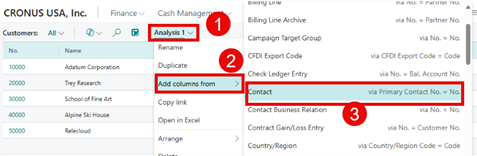
These reporting enhancements demonstrate Microsoft's commitment to providing tools that empower businesses to make data-driven decisions.
Supply Chain and Manufacturing: Streamlining Operations
Supply chain and manufacturing processes are at the heart of many businesses. The Business Central 2025 Release Wave 1 introduces features designed to improve efficiency and usability.
- Supply Chain:
- Reschedule within safety lead time.
- Cancel production orders with consumption.
- Concurrent inventory posting.
- Additional fields on pages for better data visibility.
- Manufacturing:
- Improved usability and over-picking capabilities.
- Omit warehouse picks for manual flushing methods.
- Output with warehouse put-aways.
- Block items or variants from production output.
- Reopen finished production orders.
- Print barcodes from production orders.
- Manage attachments and edit in Excel for item, output, and consumption journals.
These updates help businesses optimize operations, reduce waste, and improve productivity.
User Experience: Enhancing Accessibility and Usability
Microsoft continues prioritizing user experience with several updates to improve accessibility and usability.
- Preview PDF Attachments: Users can preview PDF attachments directly in the web client, saving time and improving workflow efficiency.
- Optimize Screen Estate Usage: This feature will optimize screen space in the web client in June, enhancing usability.
- Adjust Factbox Pane Width: Users can now adjust the width of the Factbox pane, allowing for a more customized interface.
These enhancements make Business Central more intuitive and user-friendly, ensuring a comfortable and seamless user experience.
Feature Management: Testing New Features
Business Central 2025 Release Wave 1 updates feature management capability, allowing businesses to activate and test new features before they are automatically enabled. That gives organizations greater control over their Business Central environment, ensuring a smooth transition to new functionalities. Always test new features in your Sandbox before deploying in production.

Business Central 2025 Release Wave 1: Summary
In conclusion, Microsoft Dynamics 365 Business Central 2025 Release Wave 1 is a cornerstone for businesses aiming to streamline operations, enhance efficiency, and adapt to a constantly evolving marketplace.
With each release, Microsoft reaffirms its commitment to innovation and user-centric improvements, such as the 2025 Release Wave 1.
By embracing these updates and partnering with experts like Liberty Grove Software, businesses can unlock their full potential, ensuring they stay ahead in today’s competitive landscape.
Ready to Embrace Business Central 2025 Release Wave 1 Newest Features?
At Liberty Grove Software, we understand that implementing new features can be challenging. That's why we're here to help. Our team of experts, with years of experience in Microsoft Dynamics 365 Business Central, is dedicated to ensuring that your organization can take full advantage of the 2025 Release Wave 1 enhancements. From planning and customization to training and support, we'll work with you every step of the way to ensure a successful implementation.
If you're ready to implement the latest Business Central enhancements, I invite you to contact Liberty Grove for a complimentary consultation on how our team of experts can guide your organization through the update implementation process.
With Liberty Grove Software by your side, you can confidently embrace these changes and unlock new opportunities for growth and success. These updates enhance business efficiency, streamline operations, and drive growth, leading to a more successful and competitive organization.
Let Liberty Grove be your partner in successfully implementing the latest BC updates and ensuring your business thrives.
About Andrew Good
Andrew Good, CEO, Liberty Grove Software
Andrew Good, CEO of Liberty Grove Software, a leader in digital transformation, directs the company with strategic insights that deliver impactful results. With over two decades of expertise in Microsoft technologies, Andrew has guided businesses through digital transformations across various industries, including manufacturing, finance, and healthcare.
Andrew's extensive knowledge comes from personal experiences with various companies. His hands-on operational knowledge stems from his experience in engineering and maintenance and his operational roles at Unilever and Sony Music. His fourteen years of working with Microsoft Dynamics BC/NAV include successful projects in ERP, Computerized Maintenance Management Systems (EAM), and quality systems.
His passion for technology is matched by his love for sailing, which inspires his leadership. Andrew parallels the precision required for navigating the seas with the challenges of steering a successful company. Under his leadership, Liberty Grove Software thrives, providing tailored solutions that empower clients and optimize operations with innovative, Microsoft-based systems.
Connect with Andrew on LinkedIn
Subscribe to Andrew’s Newsletter on LinkedIn

In today's dynamic business environment, making informed decisions quickly and securely isn't just an advantage; it's a necessity. As organizations evolve, the need for agile, secure, and data-driven systems becomes increasingly vital. Microsoft Dynamics 365 Business Central (BC) offers a Software-as-a-Service (SaaS) model that provides businesses with a robust platform that delivers precisely what they need.
In this blog, I'll dive into the key benefits of moving to Business Central SaaS, focusing on enhanced reporting, improved collaboration through tools like Teams and Outlook integration, and continuous security and performance monitoring.
Enhanced Reporting for Data-Driven Decisions
One of Business Central SaaS's standout advantages is its enhanced reporting capabilities. In today's competitive business landscape, the power of data is undeniable. Accurate, real-time insights into your operations empower you to make informed decisions that drive productivity and profitability.
Real-Time Visibility and Flexibility
Unlike traditional on-premises systems, BC SaaS delivers real-time data updates with every transaction. That means that dashboards, KPIs, and customized reports reflect the current state of your business – no more waiting overnight or manually consolidating data from disparate sources. Whether you're tracking sales performance, inventory levels, or customer interactions, the dashboard tools available in Business Central offer unparalleled visibility. Advanced data visualization and integration with tools like Power BI further enhance your ability to sift through complex data sets and gain actionable insights.
Customization for Your Unique Needs
BC SaaS is designed with flexibility, enabling organizations to tailor their reporting outcomes to meet specific business needs. With custom fields, user-defined metrics, and dynamic dashboards, you can drill down into the metrics that matter most to your business. For managers and executives, this level of customization translates into faster decision-making cycles, as every report is tuned to your strategy and operations. The latest updates in Excel reporting allow you to tailor your reports, so you get your data in the format you need.
Enhanced Reporting
The enhanced reporting capabilities improve internal transparency and pave the way for a more collaborative approach to business intelligence. With shared dashboards and real-time reporting, teams across departments can collaborate on the same data, harmonizing their efforts and aligning their strategies. This collective approach to data yields improved forecasts, more effective resource allocation, and, ultimately, more informed business decisions.

Improved Collaboration: Teams and Outlook Integration
Effective collaboration is the heartbeat of any successful enterprise. BC SaaS surpasses traditional ERP functionality by seamlessly integrating Microsoft's collaboration tools, including Teams and Outlook. This integration streamlines communication, unifies workflows, and transforms how teams connect.
Collaboration with Microsoft Teams
· A Unified Communication Hub
Microsoft Teams has become a cornerstone for organizational communication. With BC SaaS, integrating with Teams means your business processes and conversations are now interlinked. Imagine being able to discuss a sales report directly within a Teams channel while viewing the latest metrics pulled from Microsoft Dynamics 365 Business Central. Real-time collaboration like this enhances productivity and fosters a culture of transparency and teamwork.
· Streamlined Workflows and Project Management
Teams integration within BC SaaS allows the creation of task groups, project channels, and instant messaging associated with specific business processes. Whether you're coordinating on a multi-department project or seeking input on a critical operational decision, Teams ensures that every relevant party is connected. This capability has proven invaluable for incident management and strategic initiatives, where input from multiple stakeholders is essential for fast and effective resolution.
Seamless Outlook Integration
· Enhancing Communication and Scheduling
Outlook remains the backbone of professional communication for many organizations. BC SaaS's native integration with Outlook revolutionizes how you manage communications, scheduling, and records. For instance, emails, calendar events, and contact information can be seamlessly linked to relevant business records in Microsoft Dynamics 365 Business Central. This interconnectedness ensures the tracking of customer communications and sales opportunities, capturing all critical details.
· Redefining Workflow Efficiency
With Outlook integration, your team can convert emails into actionable tasks, schedule follow-up meetings, and even associate conversations with specific customer records—all directly within Business Central. This streamlined process eliminates redundant data entry and significantly enhances workflow efficiency. In today's fast-paced environment, the ability to seamlessly move between platforms without disruption is nothing short of transformative.

Continuous Security and Performance Monitoring
In an age of ever-present cyber threats, the security and performance of your business systems are paramount. BC SaaS addresses these concerns head-on, offering continuous security and performance monitoring that keeps your operations safe, compliant, and running at peak efficiency.
Automatic Security Updates and Compliance
One of the most significant advantages of a SaaS model is that Microsoft continuously updates your application with the latest security patches. BC SaaS automatically benefits from rapid, enterprise-grade security enhancements, unlike traditional on-premise systems, which often require manual updates and leave vulnerabilities unaddressed. That means you can focus on growing your business without fearing outdated security practices. Moreover, these updates ensure that your business remains compliant with regulatory standards, a vital aspect for industries where data protection is non-negotiable.
Proactive Performance Monitoring
Performance bottlenecks can significantly impact productivity and customer satisfaction. BC SaaS includes built-in performance monitoring that continuously evaluates system efficiency and resource utilization. By leveraging advanced analytics and machine learning, the system can proactively identify potential performance issues before they escalate, enabling your IT team to address them swiftly. This proactive approach minimizes downtime, ensures a smooth user experience, and maximizes the return on your technology investment.
Reduced IT Overhead
Continuous monitoring also translates to reduced IT overhead. With Microsoft BC SaaS, your organization no longer needs to worry about the complexities of maintaining secure, high-performing infrastructure. Microsoft's robust cloud infrastructure handles the heavy lifting for you, enabling your team to focus on strategic initiatives rather than addressing technical issues. This shift not only reduces operational costs but also increases overall business agility.

Embracing the Future with Business Central SaaS
At Liberty Grove Software, we believe embracing cloud technologies like BC SaaS is pivotal for businesses striving for excellence. Enhanced reporting, improved collaboration, and continuous security are not just features—they are strategic assets that drive innovation and competitiveness.
By leveraging the power of BC SaaS, your organization can transform how it processes data, collaborates across departments, and safeguards its critical operations. Seamlessly integrating tools like Teams and Outlook enhances communication and workflow, enabling your teams to work more effectively. Meanwhile, continuous security and performance monitoring provide peace of mind, allowing us to focus on growth rather than administration.
Transitioning to BC SaaS is more than just a technology upgrade; it's a strategic move toward building a resilient, agile, and innovative organization. At Liberty Grove Software, we are proud to guide our clients through this journey, ensuring they harness Business Central's full potential to drive long-term success.
Ready to Get Current with BC SaaS?
I invite you to explore how BC SaaS can empower your organization to achieve greater efficiency, robust security, and unparalleled collaboration. Let's work together to leverage the latest technology innovations that transform challenges into opportunities and drive your business forward.
If you're ready to learn more about how BC SaaS can redefine your operations, contact Liberty Grove for a complimentary consultation on how its team of experts can guide your organization through a cloud ERP migration strategy and the transition to Dynamics 365 Business Central.
Let's embark on this journey toward a more connected, secure, and dynamic future where your business thrives.
About Andrew Good
Andrew Good, CEO, Liberty Grove Software
Andrew Good, CEO of Liberty Grove Software, a leader in digital transformation, directs the company with strategic insights that deliver impactful results. With over two decades of expertise in Microsoft technologies, Andrew has guided businesses through digital transformations across various industries, including manufacturing, finance, and healthcare.
Andrew's extensive knowledge comes from personal experiences with various companies. His hands-on operational knowledge stems from his experience in engineering and maintenance and his operational roles at Unilever and Sony Music. Fourteen years of working with Microsoft Dynamics BC/NAV follows successful projects in ERP, Computerized Maintenance Management Systems (EAM), and quality systems.
His passion for technology is matched by his love for sailing, which inspires his leadership. Andrew parallels the precision required for navigating the seas with the challenges of steering a successful company. Under his leadership, Liberty Grove Software thrives, providing tailored solutions that empower clients and optimize operations with innovative, Microsoft-based systems.
Connect with Andrew on LinkedInSubscribe to Andrew’s Newsletter on LinkedIn